WPF开发者QQ群: 340500857 | 微信群 -> 进入公众号主页 加入组织
每日一笑
刚和另一位摸鱼大户同事聊天,说起业余爱好。我:"我下班就看看电影打打游戏,你呢?"同事:"帮人做网站挣点外快,另外最近我目前在做一个区块链的创业项目,已经占我总收入10%了 。我有时候回复工作消息慢就是在搞这个。"感觉被背叛了,原来只有我是傻呵呵地真摸鱼。
前言
需要实现仪表盘。
欢迎转发、分享、点赞,谢谢大家~。
效果预览(更多效果请下载源码体验):
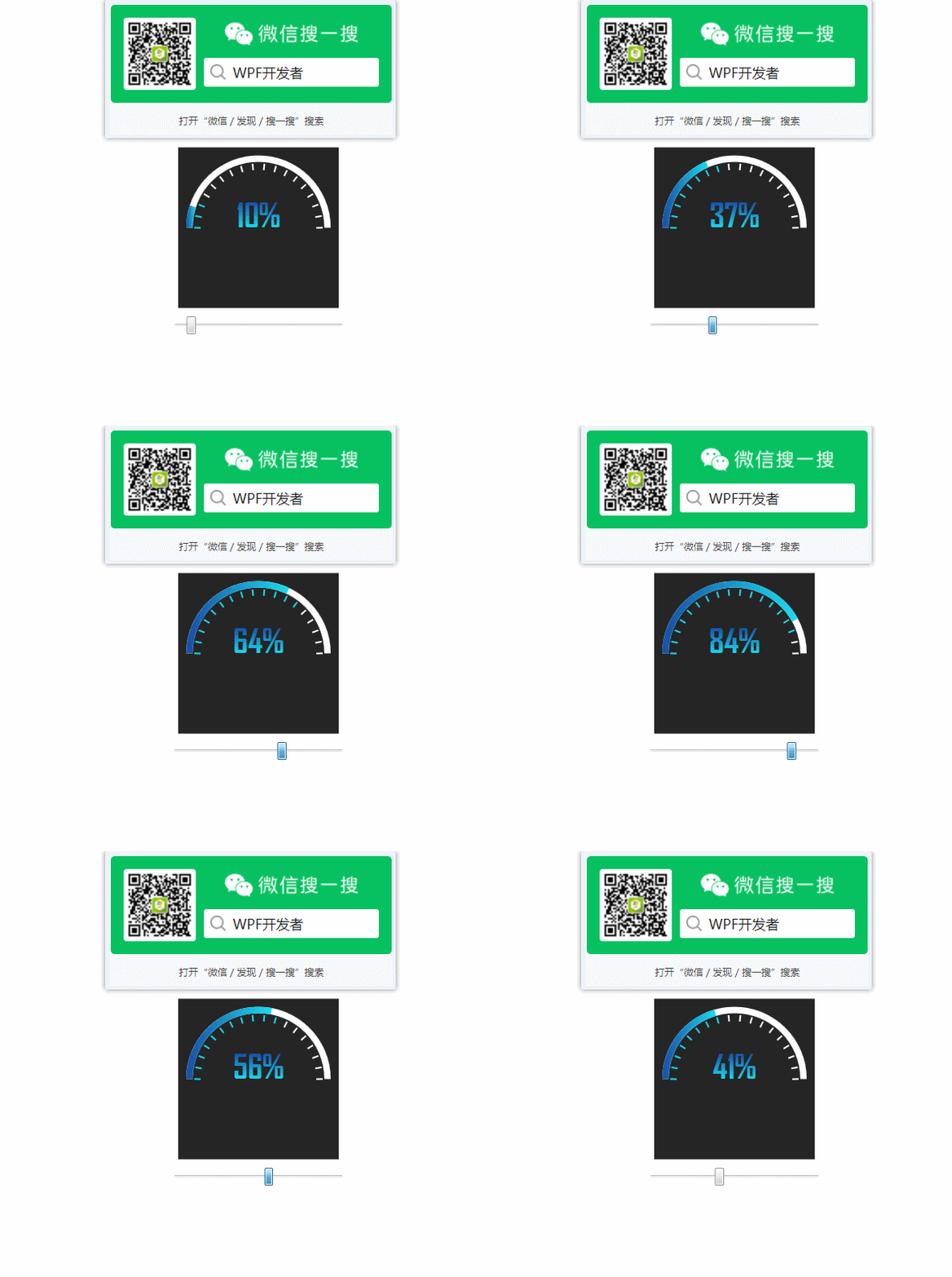
一、DashboardControl.cs 代码如下
using System;using System.Collections.Generic;using System.Linq;using System.Windows;using System.Windows.Controls;using System.Windows.Media;using System.Windows.Media.Animation;using WpfDashboard.Models;namespace WpfDashboard{ public class DashboardControl : ProgressBar { public DashboardControl() { this.ValueChanged += CircularProgressBar_ValueChanged; } void CircularProgressBar_ValueChanged(object sender, RoutedPropertyChangedEventArgs<double> e) { DashboardControl bar = sender as DashboardControl; double currentAngle = bar.Angle; double targetAngle = e.NewValue / bar.Maximum * 180; Angle = targetAngle; if (ScaleArray == null) ArrayList(); var count = Convert.ToInt32(Angle / (180 / ScaleNum)); ScaleArray.ToList().ForEach(y => { y.Background = Brushes.White; }); Brush color = new SolidColorBrush((Color)ColorConverter.ConvertFromString("#FF19DCF0")); ScaleArray.Where(x => x.Index <= count).ToList().ForEach(y => { y.Background = color; }); } public double Angle { get { return (double)GetValue(AngleProperty); } set { SetValue(AngleProperty, value); } } public static readonly DependencyProperty AngleProperty = DependencyProperty.Register("Angle", typeof(double), typeof(DashboardControl), new PropertyMetadata(0.0)); public IList<ScaleModel> ScaleArray { get { return (IList<ScaleModel>)GetValue(ScaleArrayProperty); } private set { SetValue(ScaleArrayProperty, value); } } public static readonly DependencyProperty ScaleArrayProperty = DependencyProperty.Register("ScaleArray", typeof(IList<ScaleModel>), typeof(DashboardControl), new PropertyMetadata(null)); public int ScaleNum { get { return (int)GetValue(ScaleNumProperty); } set { SetValue(ScaleNumProperty, value); } } public static readonly DependencyProperty ScaleNumProperty = DependencyProperty.Register("ScaleNum", typeof(int), typeof(DashboardControl), new PropertyMetadata(18)); void ArrayList() { List<ScaleModel> shortticks = new List<ScaleModel>(); for (int i = 0; i < ScaleNum; i++) { shortticks.Add(new ScaleModel { Index = i, Background = Brushes.White }); } this.ScaleArray = shortticks; } }}二、App.xaml 代码如下
<Application x:Class="WpfDashboard.App" ="" ="" ="" ="" ="clr-namespace:WpfDashboard" StartupUri="MainWindow.xaml"> <Application.Resources> <LinearGradientBrush x:Key="NormalBrush" EndPoint="0.5,1" StartPoint="0.5,0"> <GradientStop Color="#FF164DA7"/> <GradientStop Color="#FF19DCF0" Offset="1"/> </LinearGradientBrush> <Style TargetType="local:DashboardControl"> <Setter Property="Maximum" Value="100"/> <Setter Property="Background" Value="#252525"/> <Setter Property="Width" Value="200"/> <Setter Property="Height" Value="200"/> <Setter Property="Template"> <Setter.Value> <ControlTemplate TargetType="local:DashboardControl"> <Viewbox> <Grid Width="{TemplateBinding Width}" Height="{TemplateBinding Height}" Background="{TemplateBinding Background}" RenderTransformOrigin="0.5,0.5"> <Grid.RenderTransform> <TransformGroup> <RotateTransform Angle="-90"/> </TransformGroup> </Grid.RenderTransform> <ed:Arc ArcThickness="8" ArcThicknessUnit="Pixel" Fill="White" RenderTransformOrigin="0.5,0.5" StartAngle="0" EndAngle="180" Stretch="None" Margin="10"/> <ed:Arc x:Name="PART_PathBackground" Margin="24" ArcThickness="0" ArcThicknessUnit="Pixel" EndAngle="180" StartAngle="0" Stretch="None" /> <ed:Arc ArcThickness="8" ArcThicknessUnit="Pixel" Fill="{StaticResource NormalBrush}" StartAngle="0" EndAngle="{Binding Angle, RelativeSource={RelativeSource FindAncestor, AncestorType=ProgressBar}}" Stretch="None" Margin="10"/> <ec:PathListBox IsHitTestVisible="False" ItemsSource="{Binding ScaleArray,RelativeSource={RelativeSource FindAncestor,AncestorType=ProgressBar}}"> <ec:PathListBox.ItemTemplate> <DataTemplate> <Border Width="2" Height="8" Background="{Binding Background}" SnapsToDevicePixels="True" UseLayoutRounding="True" /> </DataTemplate> </ec:PathListBox.ItemTemplate> <ec:PathListBox.LayoutPaths> <ec:LayoutPath Distribution="Even" Orientation="OrientToPath" SourceElement="{Binding ElementName=PART_PathBackground}" /> </ec:PathListBox.LayoutPaths> </ec:PathListBox> <Border R......原文转载:http://www.shaoqun.com/a/879522.html
跨境电商:https://www.ikjzd.com/
ryder:https://www.ikjzd.com/w/1264.html
woot:https://www.ikjzd.com/w/604
stylenanda:https://www.ikjzd.com/w/1675.html
WPF开发者QQ群:340500857|微信群->进入公众号主页加入组织每日一笑刚和另一位摸鱼大户同事聊天,说起业余爱好。我:"我下班就看看电影打打游戏,你呢?"同事:"帮人做网站挣点外快,另外最近我目前在做一个区块链的创业项目,已经占我总收入10%了。我有时候回复工作消息慢就是在搞这个。"感觉被背叛了,原来只有我是傻呵呵地真摸鱼。前言需要实现仪表盘。欢迎转发、分享、点赞,谢谢大家~。效果预
2021里水百合花文化节免费吗?里水百合花文化节2021门票免费时间?:http://www.30bags.com/a/432416.html
2021立秋是什么时候?:http://www.30bags.com/a/401622.html
2021丽江必去景点推荐 丽江有什么好玩的地方:http://www.30bags.com/a/423648.html
2021荔枝湾水上花市几号开始?广州荔枝湾水上花市游船票价多少钱?:http://www.30bags.com/a/423009.html
被几个上司玩弄一晚上 一夜被三个男人灌满了:http://lady.shaoqun.com/a/247431.html
少妇口述:乱性丈夫将我拖进换妻游戏:http://www.30bags.com/m/a/249618.html
口述:继父将我从沙发拖到床上纵欲继父妈妈沙发:http://www.30bags.com/m/a/249537.html
我给睡着的老师开嫩苞 小坏蛋太大了老师受不了了:http://www.30bags.com/m/a/249941.html
2021暑假适合去哪里旅游经济又实惠 暑假旅游便宜划算的好去处 :http://www.30bags.com/a/504682.html
跨境电商调查丨全球税改加速电商合规,中国商家借力"海外仓"破局:https://www.ikjzd.com/articles/146648
不限票免费!教师节福利来了,邀请你去享受可爱的宠物公园!:http://lady.shaoqun.com/a/423158.html
如何保持性生活新鲜情侣可以尝试的五个技巧:http://lady.shaoqun.com/a/423159.html

没有评论:
发表评论